Acaraje, the Foundation of PostPortuguese
Tagged with: PostPortuguese, iOS, Mastodon, Bluesky, Threads, architecture, Swift, framework
1405 words; 6 minutes to read
In the first post, I talked about the problem: copying the same text into three different apps, one after another, is tedious and there had to be a better way. Now I want to talk about the structure I’ve been putting together to solve it, a Swift package called Acaraje, designed together with Diogo.
The name is not random. Acarajé is a traditional dish from Bahia, Brazil, made from peeled beans fried in dendê oil. It is sold on the streets by baianas, women from Bahia who carry their ingredients and tools on a tray called a tabuleiro. The whole setup is a small, self-contained operation: one person, one tray, everything they need to serve everyone who comes by.
That felt like the right metaphor for what I was building.
The core idea
The goal of Acaraje is to give a single, consistent interface for posting to multiple social platforms, while still letting each platform behave exactly as it needs to.
This is the tension at the heart of the problem. Mastodon is federated, meaning you connect to a specific server, not a single central authority. Bluesky uses the AT Protocol, with its own OAuth flow and its own quirks. Threads is a Meta product with a Meta-flavored API. They are genuinely different. A good abstraction cannot pretend they are the same, but it also should not force every caller to care about those differences.
The way Acaraje handles this is through three layers: the Tabuleiro protocols, the platform implementations, and the Baiana that ties them together.
Tabuleiro: describing what a platform can do
A Tabuleiro is a protocol. At its most basic, it just says: “this thing knows about some accounts, and can log them out.”
public protocol Tabuleiro: Sendable {
    func fetchAccounts() -> [any Account]
    func logout(account: any Account) async throws
}
That is the floor. From there, a platform can opt into additional capabilities by conforming to more specific protocols.
Authentication comes in two flavors, because not all platforms work the same way. Centralized platforms like Bluesky have a single login endpoint:
public protocol AuthenticatableTabuleiro: Tabuleiro {
    func authenticate() async throws -> any Account
}
Federated platforms like Mastodon need to know which server you are connecting to:
public protocol FederatedTabuleiro: Tabuleiro {
    func authenticate(instance: URL) async throws -> any Account
}
Posting is also split by content type. Text posts, single image posts, multiple image posts, video posts: each is its own protocol. A platform only conforms to what it actually supports.
public protocol TextTabuleiro: Tabuleiro {
    var maxTextLength: Int { get }
    func validateText(_ text: String) -> TextValidationResult
    func post(text: String, language: Locale?, quotePolicy: QuotePolicy?, replyTo: (any Post)?, accounts: [any Account]?) async throws -> [any Post]
}

public protocol MultipleImageTabuleiro: Tabuleiro {
    var imageLimit: Int { get }
    func post(images: [ImageAttachment], text: String?, language: Locale?, quotePolicy: QuotePolicy?, replyTo: (any Post)?, accounts: [any Account]?) async throws -> [any Post]
}
This matters for a platform like Instagram, which is image-only. It would conform to AuthenticatableTabuleiro and ImageTabuleiro, but not TextTabuleiro. The rest of the system does not need to know or care about that. It just checks what the platform can do and uses what is available.
Platform implementations: the Tabuleiros
MastodonTabuleiro and BlueskyTabuleiro are the concrete implementations. Their job is to take the abstract protocols and map them to the actual API calls for each platform.
MastodonTabuleiro conforms to FederatedTabuleiro, because you have to pick a Mastodon server. It also conforms to TextTabuleiro, ImageTabuleiro, and MultipleImageTabuleiro, because Mastodon supports all of those. The maxTextLength comes from the server configuration, typically 500 characters.
BlueskyTabuleiro conforms to AuthenticatableTabuleiro, since Bluesky is centralized. Under the hood it uses a low-level AT Protocol client in a separate BlueskyAPI module, which handles the OAuth flow, DPoP tokens, XRPC calls, and token refresh. None of that leaks into the higher-level tabuleiro interface.
This separation is intentional. The platform-specific complexity lives inside the tabuleiro. Callers only ever see the protocols.
Baiana: the one who serves everyone
The Baiana is the coordinator. You give it a list of tabuleiros, and it knows how to delegate calls to the right ones.
public final class Baiana: Sendable {
    public let tabuleiros: [any Tabuleiro]

    public init(tabuleiros: [any Tabuleiro]) {
        self.tabuleiros = tabuleiros
    }
}
When you ask the Baiana to post some text, it looks through its tabuleiros for anything conforming to TextTabuleiro, then calls all of them concurrently using a TaskGroup. Same for images, threads, and anything else. If a tabuleiro does not support the requested content type, it is simply skipped.
func post(text: String, language: Locale?, ...) async throws -> [any Post] {
    let textTabuleiros = tabuleiros.compactMap { $0 as? TextTabuleiro }
    return try await withThrowingTaskGroup(of: [any Post].self) { group in
        for tabuleiro in textTabuleiros {
            group.addTask {
                try await tabuleiro.post(text: text, ...)
            }
        }
        // collect and return results
    }
}
Threads (the linked, sequential kind, not the Meta app) are handled similarly, but with an added tracking step. The Baiana keeps track of each platform’s last post and passes it as the replyTo for the next item in the chain. Each platform gets its own reply chain, maintained independently.
The result is that the caller writes something like this:
let baiana = Baiana(tabuleiros: [mastodonTabuleiro, blueskyTabuleiro])
let posts = try await baiana.post(text: "Hello, world", language: .current, accounts: nil)
And both platforms receive the post. No manual looping. No per-platform branching.
What fits where
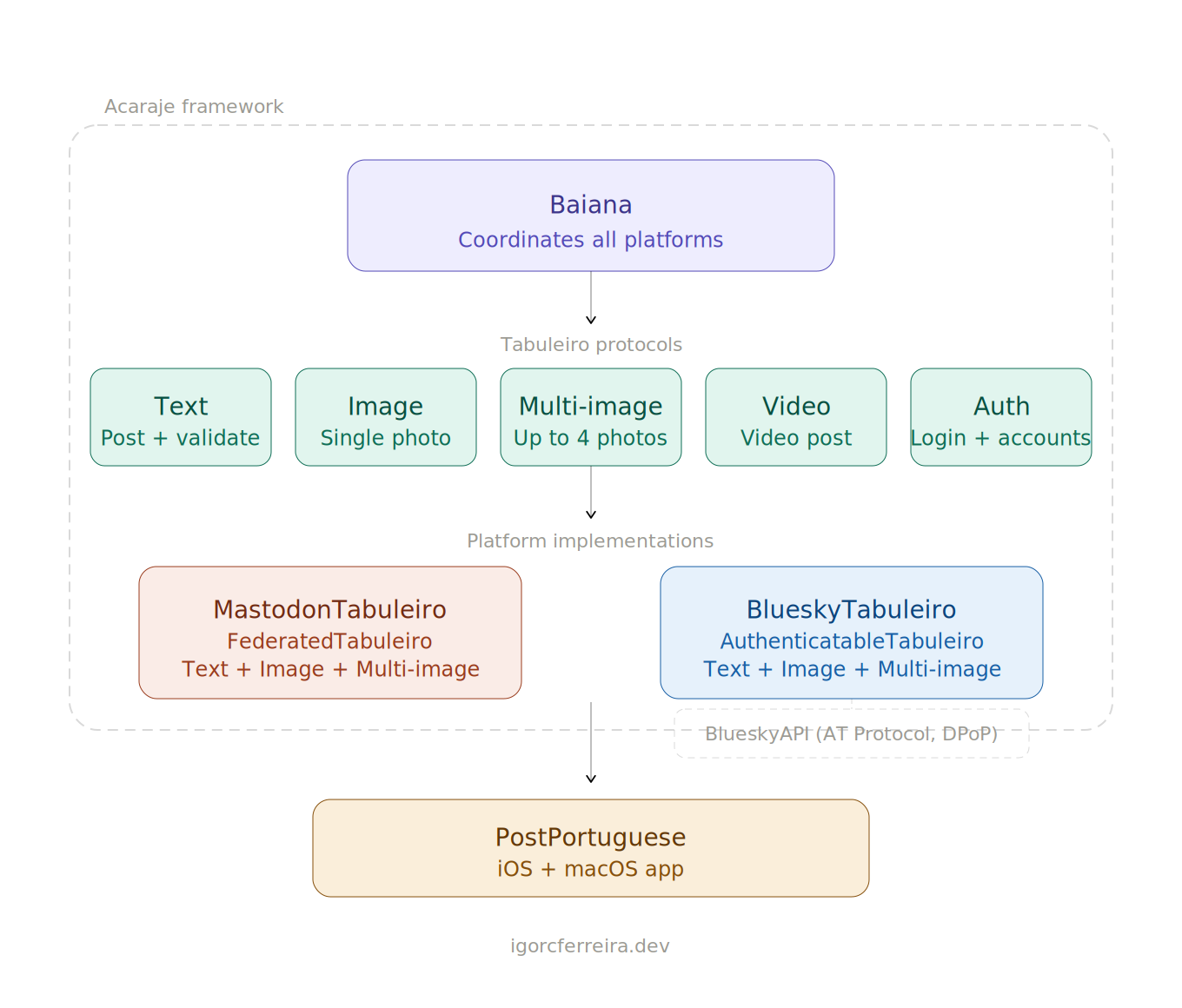
Here is a summary of the package structure, because the boundaries matter:
Acaraje: defines the protocols and data models. No platform-specific logic lives here.AcarajeKeychain: shared keychain helpers, used by the tabuleiro implementations to store credentials.MastodonTabuleiro: Mastodon implementation, built on top of TootSDK.BlueskyAPI: low-level AT Protocol client. OAuth, DPoP, XRPC. Separate from the tabuleiro so it can be used independently if needed.BlueskyTabuleiro: Bluesky implementation, usingBlueskyAPI.
The app sits on top of the same MastodonTabuleiro and BlueskyTabuleiro libraries. The tabuleiros expose a couple of app-specific extras, like a authenticateWithWebView method for Mastodon that drives login through ASWebAuthenticationSession, but the core protocols are unchanged.
Why this structure helps
The main benefit of this layered design is that adding a new platform does not touch anything that already exists. You write a new tabuleiro, conform it to whatever protocols make sense for that platform, and hand it to the Baiana. Everything else keeps working.
It also makes testing cleaner. You can write a mock tabuleiro that conforms to TextTabuleiro and returns fake posts without touching any network code. The Baiana does not know or care that it’s talking to a mock.
And it means the app and the framework share the same core libraries, with each layer adding only the bits specific to its environment, like how credential storage works or how the OAuth redirect is handled.
The name Acaraje is the right one for this. There is one tray, one Baiana, many things she can serve. The dish is made from a few ingredients combined with care, and the result is something that works in many places.
I'm Building a Cross-Posting App
Tagged with: PostPortuguese, iOS, Mastodon, Bluesky, Threads, cross-post
I found myself doing something that felt ridiculous: copying and pasting the same post into three different apps, one after another.
Structuring Claude's Context for iOS Development
Tagged with: Claude, AI Tools, LLM, Agentic AI, Developer Workflow
MCP gives LLM agents a structured way to access external tools, run commands, and pull in dynamic context. It’s powerful, and it earns its place in a lot of setups.
Integrating your app functionality into on-device LLMs
Tagged with: iOS, Android, Gemini, Apple Intelligence
On-device AI assistants are becoming first-class citizens on both iOS and Android. Apple Intelligence brings a suite of AI features deeply integrated into the system, while Google’s Gemini assistant is increasingly capable of acting across apps on Android. Both platforms now ship with on-device language models that can understand user intent and take action, without a round-trip to the cloud.
Using Koin with Kotlin Multiplatform on iOS: A Bridge Approach
Tagged with: iOS, SwiftUI, KMP, Kotlin
I was reading a post made by Gui Rambo where he demonstrates the usage of CloudKit for content hosting and feature flags. In there, he mentions:
Kotlin Multiplatform: Fixing Java Version Conflicts in the Xcode Build Phase
Tagged with: iOS, SwiftUI, KMP, Kotlin
If you’ve been working with Kotlin Multiplatform for a while, chances are you have more than one Java SDK installed on your machine. Android development, Spring Framework, CLI tooling – they don’t all agree on which Java version they want, and managing that is just part of the job.